There’s a specific kind of desk frustration that doesn’t get talked about enough: the dongle situation. You’ve got a sleek MacBook or iPad Pro, a beautiful workspace, and then — a tangle of individual adapters eating up every surface. One for HDMI. One for USB. Another for the SD card from your camera. It’s the kind of clutter that quietly drains your focus every single workday.
One Hub, Seven Jobs Done
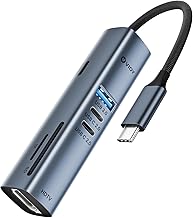
The VIOY 7-in-1 USB-C Hub is built around a straightforward premise: everything you need, in one compact adapter. Plug it into your laptop’s USB-C port and your setup instantly expands — three USB 3.0 ports at 5Gbps transfer speed, two USB-C 2.0 data ports, a 4K HDMI output, and both SD and TF card reader slots. For a home office desk, that covers virtually every real-world scenario. External drives, wireless peripherals, a second monitor, camera card imports — all routed through a single, unobtrusive hub.
The 100W Power Delivery pass-through deserves special attention. It means you can charge your MacBook Pro at full wattage through the hub itself, so you’re not sacrificing a charging port just to gain connectivity. The hub stays powered, your laptop stays topped up, and the desk stays clean. That combination — full charging plus full expansion — is what separates a good hub from a great one.
What Actually Matters in a USB-C Hub
Most people shopping for hubs get distracted by specs that sound impressive but rarely affect daily use. What actually matters: reliable 4K output (this one delivers 4K@30Hz via HDMI — stable and sharp for external monitors or client presentations), consistent transfer speeds for moving files, and a hub that doesn’t overheat during long work sessions. The VIOY holds a 4.8-star rating across hundreds of reviews because it delivers on all three without drama.
One Thing Worth Knowing Before You Buy
The two USB-C data ports run at USB 2.0 speeds, not 3.0. For most everyday tasks — connecting a wireless mouse dongle, syncing a phone, charging accessories — this is a complete non-issue. But if you regularly move large video files through those specific ports, route that traffic through the USB-A 3.0 slots instead. It’s a minor spec limitation that becomes invisible once you know how to work around it.
The Verdict
For anyone building a clean, functional home office — especially MacBook Air, MacBook Pro, or iPad Pro users — this hub closes the gap between the laptop you love and the ports your workflow actually demands. It’s one of those purchases that quietly improves your day, every day. See current pricing and availability on Amazon.
Disclosure: This post contains Amazon affiliate links. If you purchase through my links, I may earn a small commission at no extra cost to you. I only recommend products I genuinely believe in.