My laptop has one USB-C port. One. And somehow I need it to do the job of four things at once — monitor, keyboard, charging, and a thumb drive I forgot about until right now. Sound familiar?
So here’s what usually happens when you shop for a hub under $35. You get HDMI, sure, but it caps at 4K@30Hz and everything looks slightly off when you move a window. Or you get the right resolution but passthrough charging tops out at 60W, which means your MacBook is slowly dying while you work. Pick your compromise.
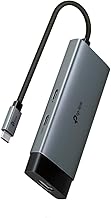
What You’re Not Giving Up
The TP-Link UH5020C does 4K@60Hz. At this price. That’s the part that made me stop scrolling. Most budget hubs quietly drop to 30Hz and bury it in the spec sheet — you don’t notice until you’re dragging windows across your monitor and everything stutters like a bad video call.
Then there’s 100W power delivery. Not 60W, not 85W. A hundred. Your laptop charges at full speed while everything else stays connected. No thermal throttling drama, no watching your battery percentage tick down during a long meeting.
Two USB-A ports and one USB-C data port, all running at 5Gbps. Enough to handle a mouse, a keyboard, and a file transfer without turning into a bottleneck. Nothing exotic. Just enough.
Who Actually Needs This
If you’re running a dual-monitor creative suite setup with three external drives? This isn’t it. Five ports. That’s the ceiling. But for the person who works off a laptop at a desk — one external display, a couple peripherals, and charging that doesn’t make you choose — it covers the daily reality without any weird workarounds.
It’s plug and play across macOS, Windows, and ChromeOS. No drivers, no software, no “please restart your computer” nonsense. Weighs barely anything. Fits in a jacket pocket if you’re hauling your setup to a coffee shop.
The Honest Catch
No ethernet port. If you’re somewhere with unreliable Wi-Fi and need a wired connection, you’ll need a separate adapter or a different hub entirely. For most people working from home or at an office with decent wireless? Not a dealbreaker. But worth knowing before you click.
Also — five ports total means you’re not expanding a full docking station here. This is a hub, not a dock. The distinction matters if you’ve got a monitor, external SSD, webcam, mic, and a ring light all competing for slots.
So Is It Actually Worth It?
At 4.8 stars across buyers, the pattern in the reviews is consistent: people expected to compromise somewhere and didn’t have to. 4K@60Hz and 100W PD in a sub-$35 hub is genuinely uncommon. Most competitors at this price make you pick one or the other.
If your setup is laptop-plus-one-monitor and you’re tired of hubs that almost do the job, this is the one I’d point you toward.
Not the hub for everyone. But for the specific problem of “I need full-res output and full-speed charging from one port without spending dock money” — it’s a genuinely hard one to beat right now.
Disclosure: This post contains Amazon affiliate links. If you purchase through my links, I may earn a small commission at no extra cost to you. I only recommend products I genuinely believe in.